Redesigning
KEATS
An end-to-end UX refresh of King's learning platform for 40,000+ students.
ROLE
Product Designer
TIMELINE
Apr – Jun 2025
SCOPE
Dashboard · Nav · Course pages
PLATFORM
King's KEATS · Moodle VLE
100% of tested students rated it excellent or good
CONTENTS
OVERVIEW
An end-to-end UX refresh, six weeks to ship.
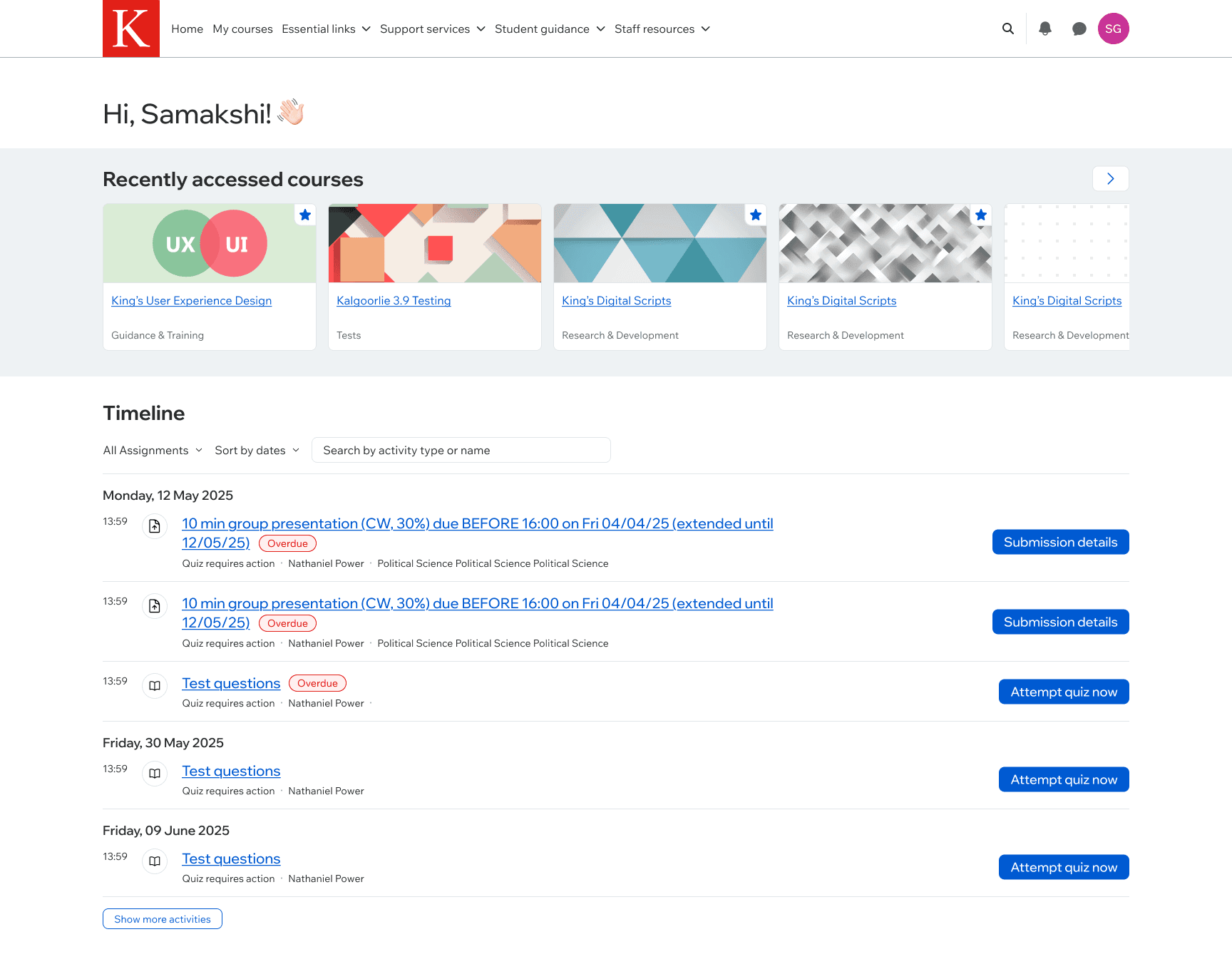
KEATS is King's College London's virtual learning environment, a Moodle-based platform used by over 40,000 students. By 2025 it had received a visual refresh but not a UX one. This was the first iteration meant to make the platform work better, not just look better.
MY OWNERSHIP
Dashboard + Custom Section
end-to-end
TEAM
2 product designers, UX manager, devs, learning technologists
PLATFORM
KEATS · King's Moodle VLE
LAUNCHED
July 2025 academic release
Outcome: Positive sentiment on the redesigned dashboard quadrupled across testing rounds. 100% of guerrilla-tested students rated the experience excellent or good. Shipped to all users on 22 July 2025 as part of the platform's Moodle 4.5.5 upgrade.
CONTEXT
When UX doesn't get to be fast
Designing for a learning platform breaks most of what you learn on consumer products. You don't get to ship continuously, product releases are strictly scheduled around the academic calendar, so a broken feature in October is live until January. You don't get to A/B test on live users, because the "user" is a student trying to submit an essay at 11:58pm, and the "test variant" is their grade.
And even though usage data streams in year-round, you can't act on it the way a consumer product can: the gap between noticing a problem and being allowed to fix it is measured in terms, not sprints.
What you can do is listen obsessively and get it right before launch.
Which is how KEATS became one of the most rigorously researched projects I've worked on, despite having the smallest iteration budget of any.
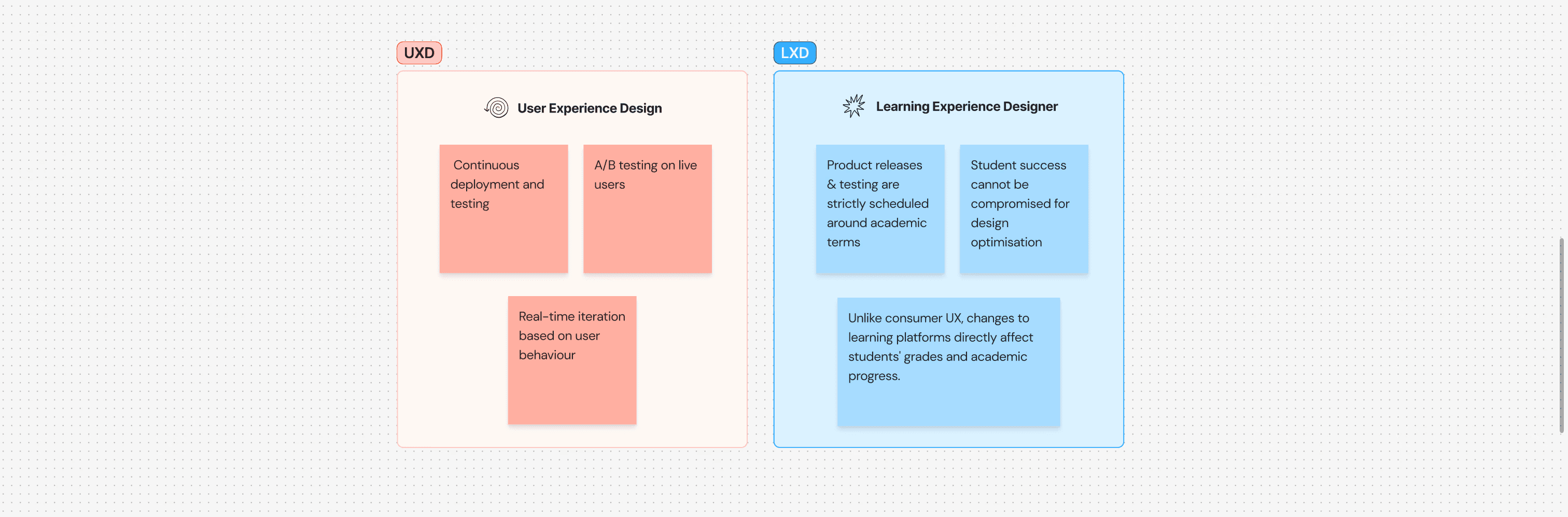
LXD constraints vs. traditional UX workflow
RESEARCH
What the data was saying
Google Analytics showed the Dashboard was the busiest page on the platform, over 60,000 sessions between September 2024 and April 2025, but also its most frustrating. Microsoft Clarity heatmaps showed rage clicks and dead clicks clustered around the main CTAs, and high quick-back rates: students landing on pages and bouncing straight back to hunt for what they hadn't found.
I sat down with Rachel & Emma, our qualitative and quantitative researchers, for a couple of working sessions to go through it properly. We watched real student journeys back, tracked where the rage and dead clicks landed, and looked at where students were dropping out and circling back. The numbers told me that something was wrong; the sessions with researchers told me what and where.
The SUS open-text responses from November 2024 and March 2025 said the same thing in plainer language:
"Too many unnecessary steps to get to information."
"Confusing and complex structure."
"A task that should take 3 clicks of a mouse takes 20."
"Homepage doesn't serve student needs."
The problem wasn't aesthetic. The things students needed daily, upcoming deadlines, recently accessed courses, platform announcements, weren't surfaced where students were looking for them. And 37% of students were trying to use the platform from a phone, on a layout built for desktop.
Rage clicks + quick-back rates on the Dashboard CTAs (Clarity, Apr 2025)
STRATEGY
Choosing what not to design
Six weeks and two designers meant we couldn't touch everything. In a kick-off workshop: UX, researchers, learning technologists, developers, we sorted every known issue into four buckets.
NO BRAINERS
High impact, low complexity
Fix now. These have a clear solution and won't create risk.
ASSUMPTIONS TO VALIDATE
Promising but uncertain
More research needed before we commit design time.
NICE TO HAVE
Real improvements
Pick up if time allows. Documented and deprioritised explicitly.
OUT OF SCOPE
Genuine problems
Not solvable before July. Goes to the "later" list and stays there.
Three focus areas emerged: the top navigation menu, the Dashboard, and the Custom Section course page format, each concentrating a different class of problem.
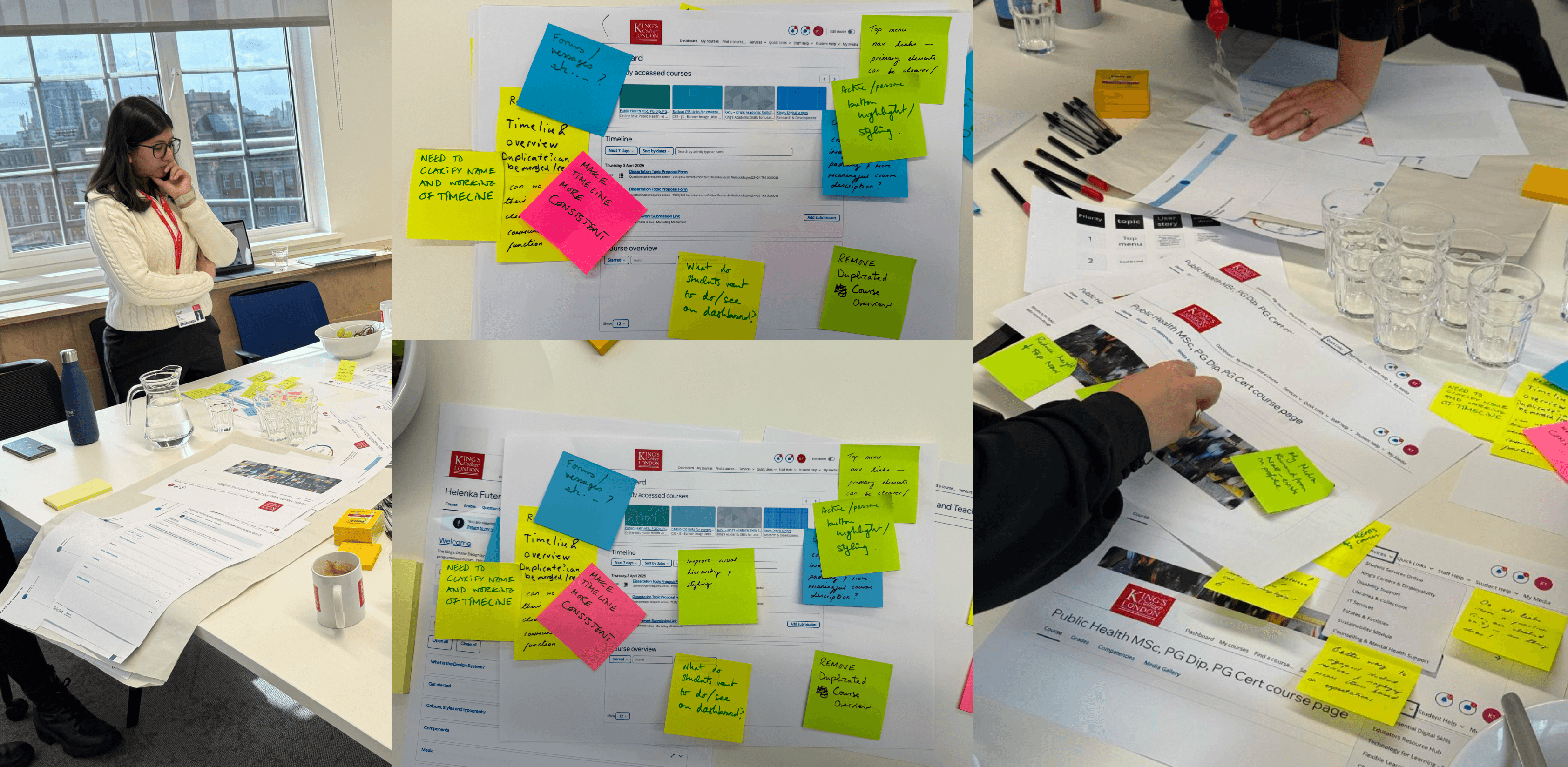
Kick-off triage workshop output
WORKSTREAM 1 OF 3
The Top Menu
This workstream was led by my colleague, Andrea. The existing structure had eight top-level categories, Dashboard, My courses, Find a course, Services, Quick Links, Staff Help, Student Help, My Media, with several overlaps in meaning. She validated a new categorisation through a card sort in Maze, then reworked the labels to be clearer about what lived inside each category.
The final structure collapsed the menu from eight items to six, Home, My courses, Essential links, Support services, Student guidance, Staff resources, with a dedicated search icon replacing the separate "Find a course" option.
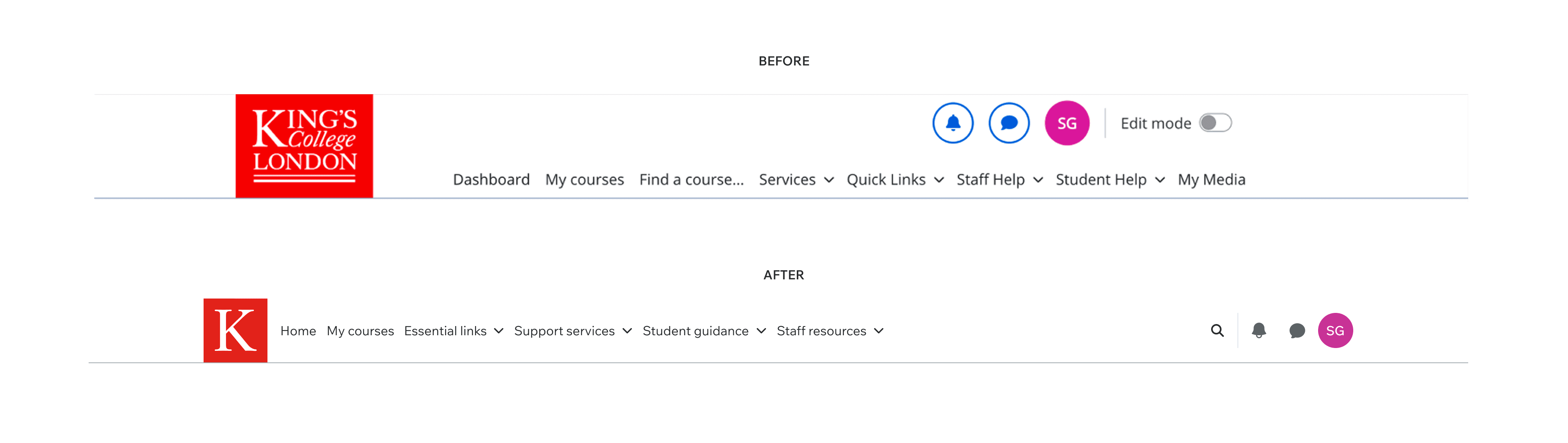
Before: 8 items with overlapping labels. After: 6 items, clear hierarchy.
WORKSTREAM 2 OF 3 — I LED THIS
The Custom Section
The Custom Section was the course page format most commonly used at King's, the layout students encountered inside most of their module pages. Structurally it worked. Visually it had accumulated over time: redundant container lines around each accordion, expand/collapse controls styled as prominent buttons that competed with the content, and an overall look that felt heavy rather than navigable.
Every unnecessary visual element on the page was cognitive load competing with the thing students had actually come to do.
My approach was restraint. I demoted the expand/collapse controls to a lighter tertiary treatment so they supported the content rather than competing with it. Removed the extra container lines so the accordion list read as a single continuous component. Applied the typography scale consistently so hierarchy was readable at a glance.
The harder constraint was Moodle itself: every change had to work inside core components, so whatever shipped would hold up across every course page using this layout without breaking.
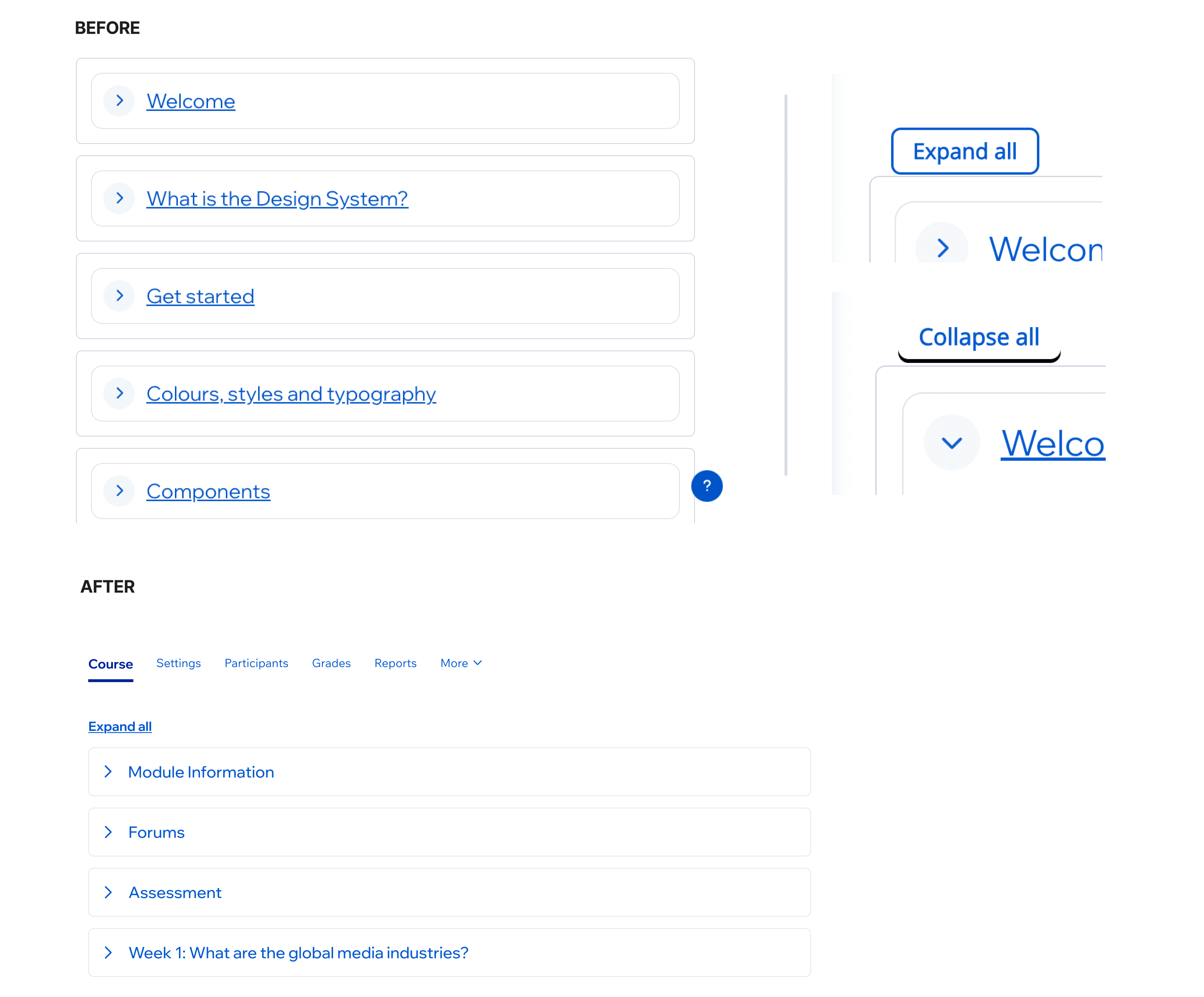
Custom Section: before (TOP) and after (BOTTOM)
WORKSTREAM 3 OF 3 — I LED THIS
The Dashboard: one hinge, two bookends
The Dashboard went through three iterations before launch. Each version was tested in Maze through unmoderated testing method.
V0 → V1
Clearing the visual debt
The Dashboard hadn't been updated since 2019, and six years of incremental changes had left it visually inconsistent. Headings ranged from 28px to 38px with no systematic reason. Course cards came in varying heights. Small alignment inconsistencies compounded across the page, so even students who couldn't name what was wrong could feel it wasn't working together.
V1 fixed the fundamentals, consistent type scale, left alignment throughout, fixed-height cards with truncated titles. The Timeline component was elevated in the hierarchy based on analytics showing it was one of the most-used features, especially on mobile, but it wasn't positioned as though it was.
On mobile, recently accessed courses were restacked into two rows: this kept navigation arrows and section headings vertically aligned and reclaimed the awkward whitespace the single-row carousel had wasted on narrower screens.
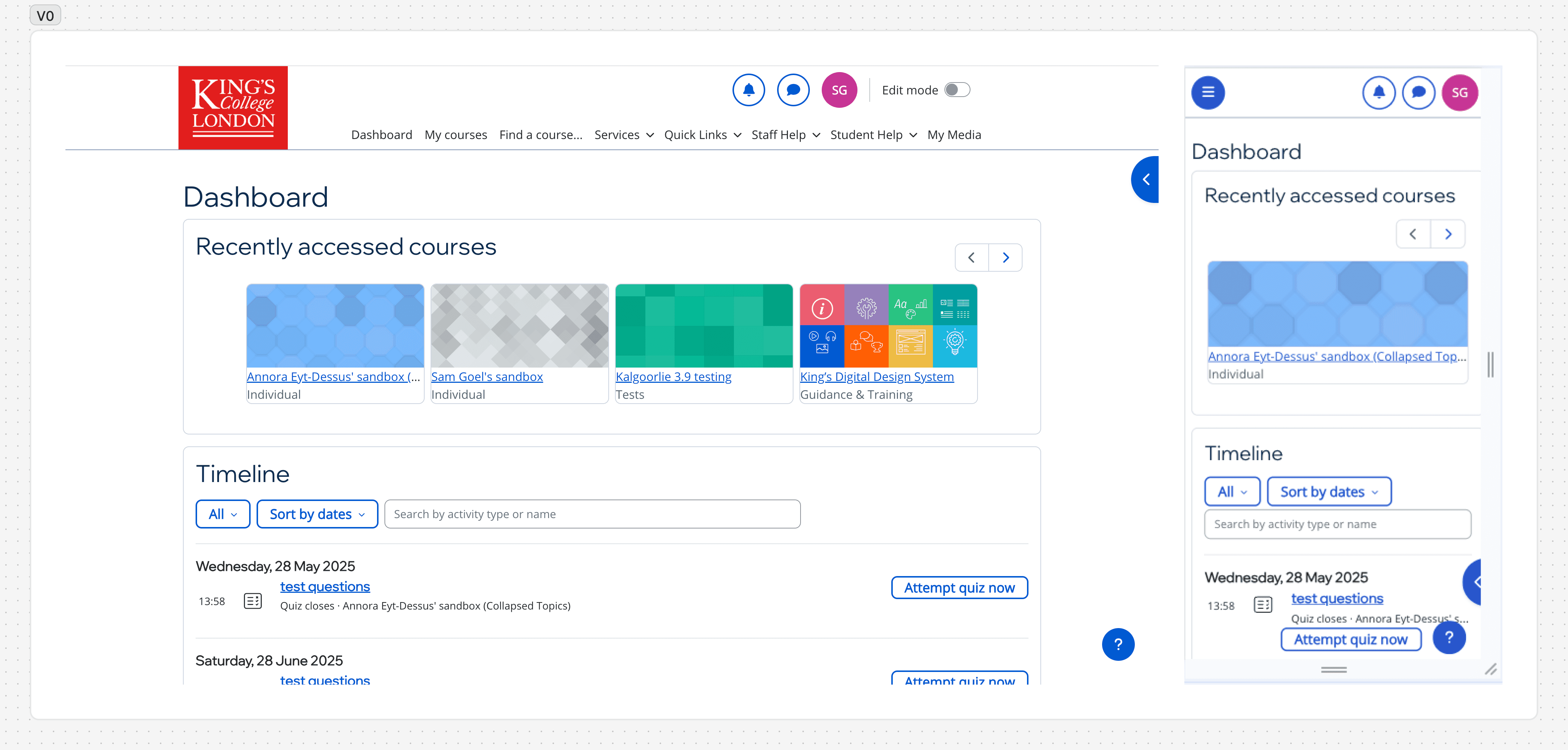
V0- Desktop & Mobile
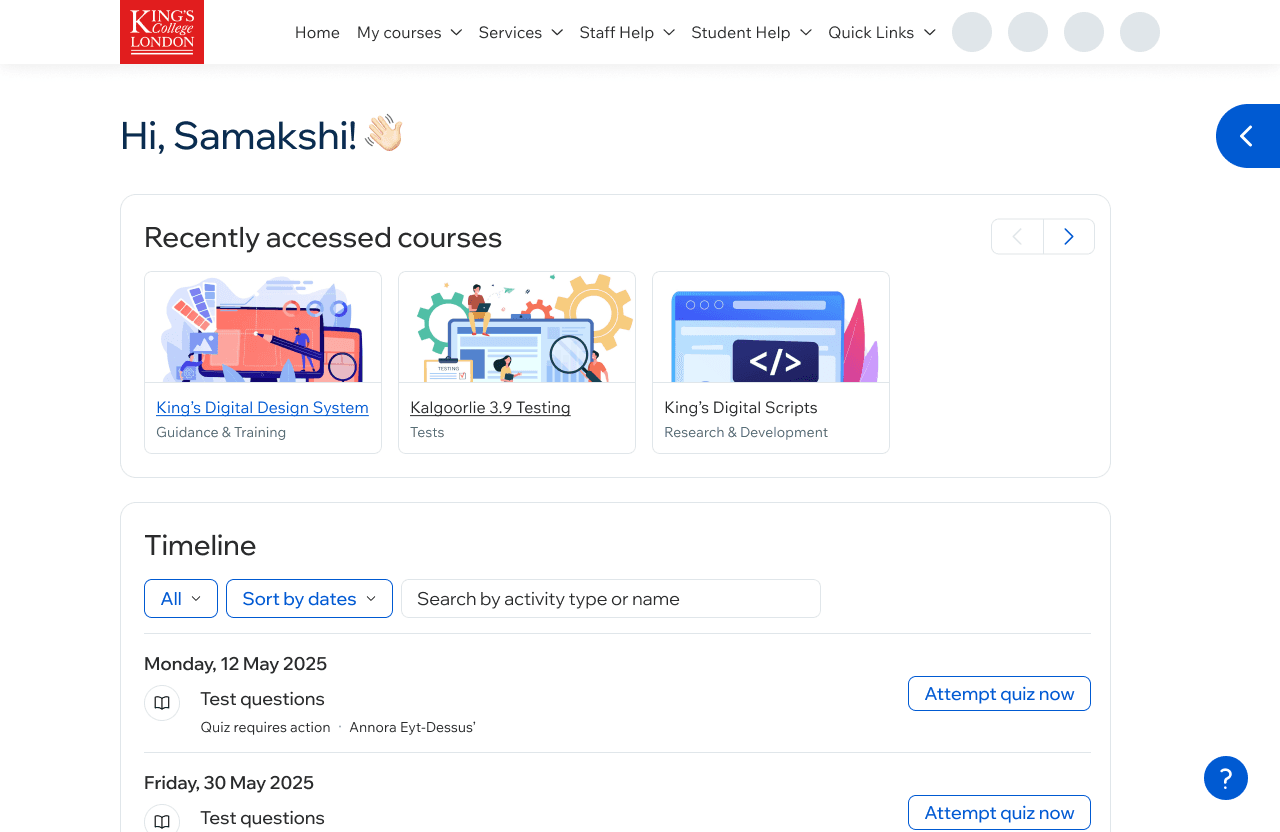
V1 post-cleanup
We put V1 in front of users. Task orientation improved. Participants located the timeline more easily. Ease-of-use ratings rose across every measure we tracked.
V1 → V2
Iterating & Exploring
V1 was tested against a specific hypothesis: that the Dashboard's problem was navigation, and that clearing visual hierarchy would fix it. The prototype tests confirmed it did.
Mid-project, a stakeholder raised a separate problem: platform-wide announcements, KEATS maintenance windows, Gradescope outages, infrastructure events, were being published elsewhere, but students weren't seeing them. The announcements existed but they just weren't reaching the people who needed them in time.
I explored it as a variation on V1. The question was whether a Latest Announcements module could earn a place on the Dashboard without displacing the two elements the research had already prioritised: Recently Accessed Courses and Timeline.
The variation that we tried was placed the module directly beneath the greeting, with the three most recent posts visible at a glance and a "View all" link into the archive. It added real estate to the page but kept Recently Accessed and Timeline above the fold on most desktop viewports, and preserved their relative position on mobile.
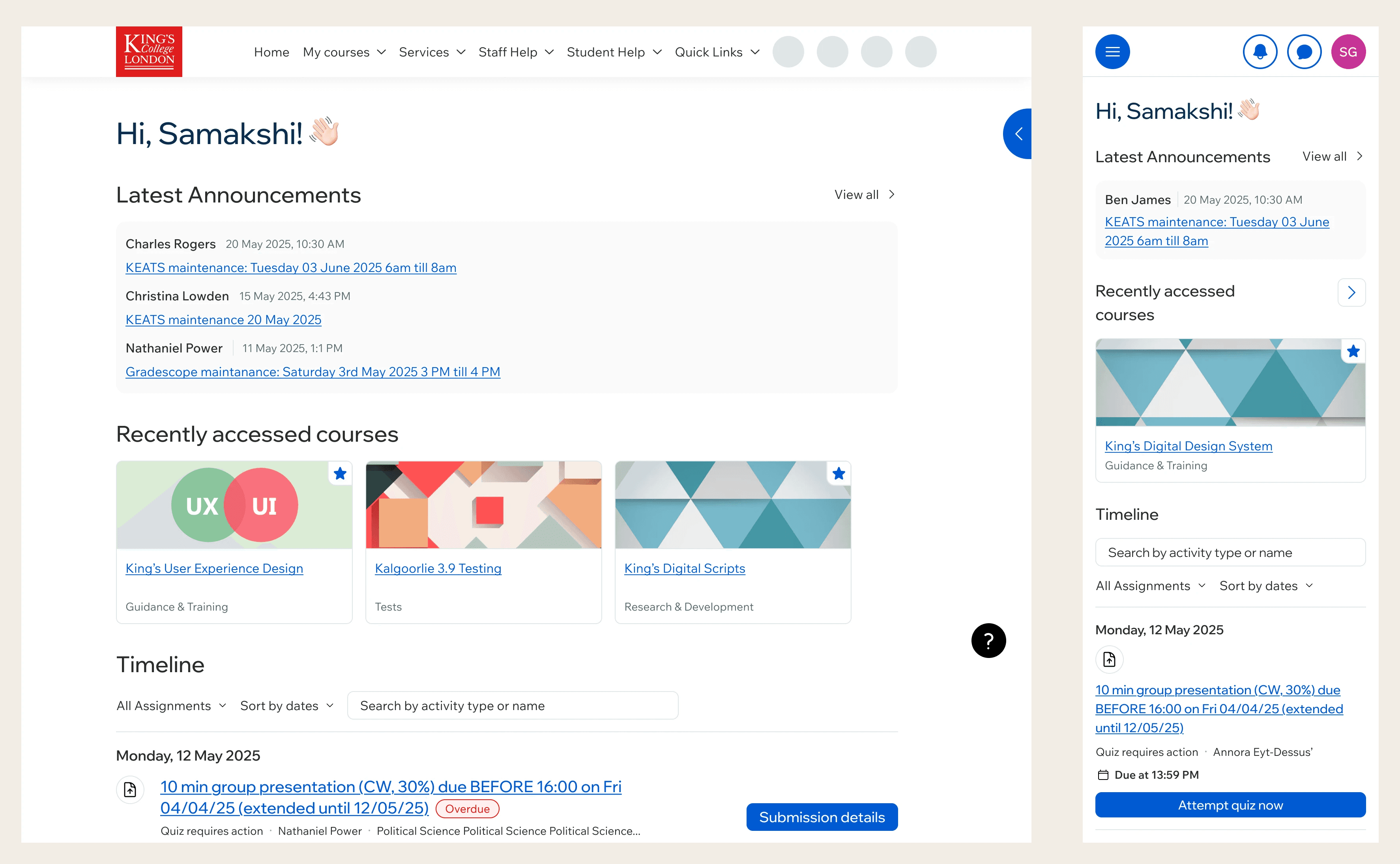
Latest Announcements bock added mid-project at stakeholder request
V3 → Shipped
The version that launched
The final pass was craft-level. Timeline items on a consistent 16px rhythm, 8px corner radius across every CTA, scrolling arrows that appeared and disappeared based on whether there was content to scroll to. Individually small changes, but the cumulative effect was a Dashboard that felt considered across its parts rather than assembled from them.
One change in V3 was functional. The Timeline's submission button had been styled as a secondary CTA, sitting alongside the assignment title link. Students were clicking the title to find their way to submit, when the submit button itself was the more direct route. Promoting it to a primary button made the route to submission obvious.
V3 also surfaced a feature the earlier versions hadn't. KEATS was moving onto Moodle 4.5.5 as part of the same release, and the upgrade is what made us aware that starring courses was something the platform already supported. It had been in Moodle's core since 2018, just not surfaced in the version KEATS was running, which was a clear win for students juggling several modules at once. The design question was where the star sat on the course card. I worked through placements on the thumbnail, inline with the title, beside the subtitle, and on its own row, testing which read fastest and held up when titles ran long. The thumbnail won.
Individually small changes. The cumulative effect was a Dashboard that felt considered across its parts rather than assembled from them.
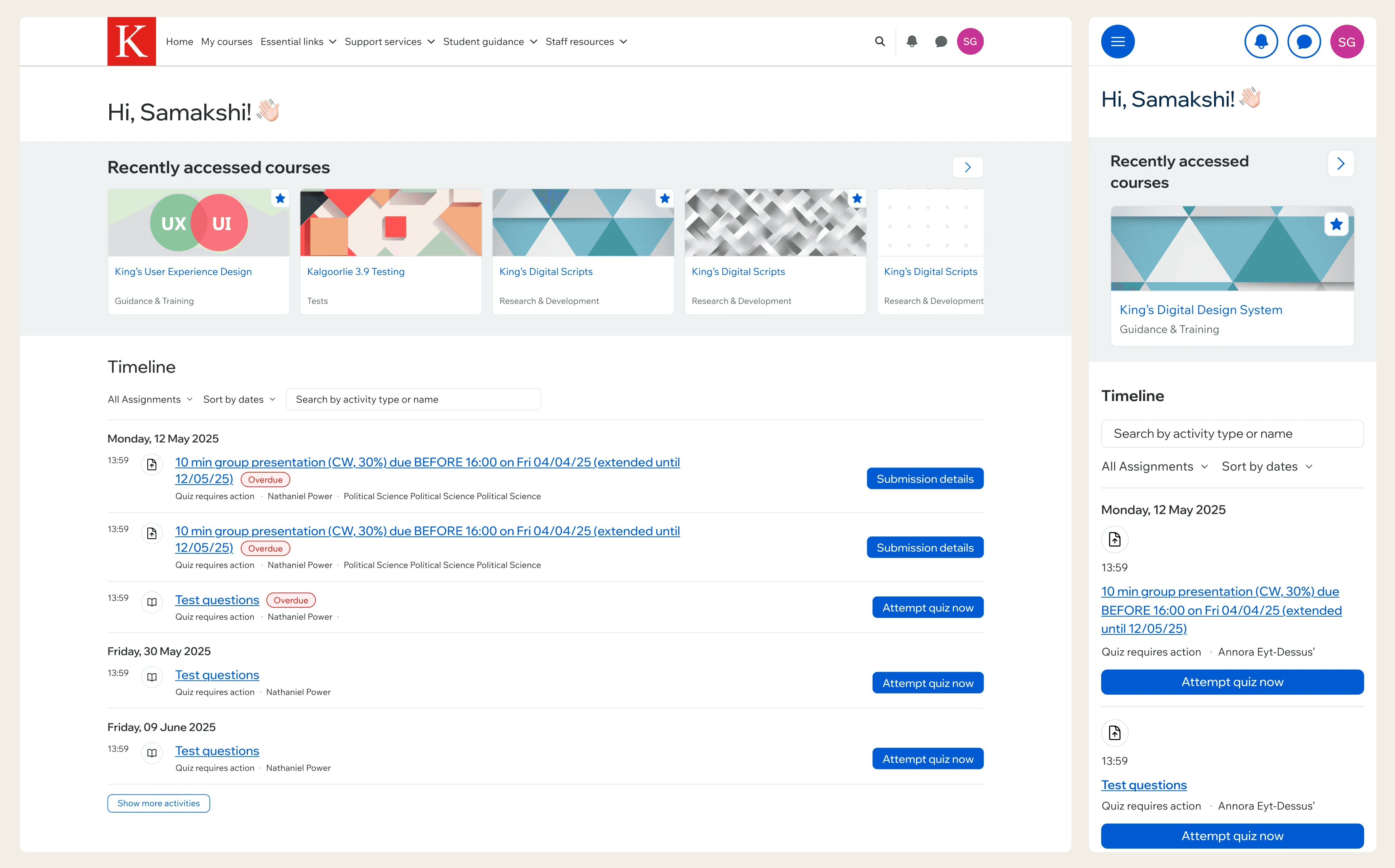
V3 in the KEATS development environment
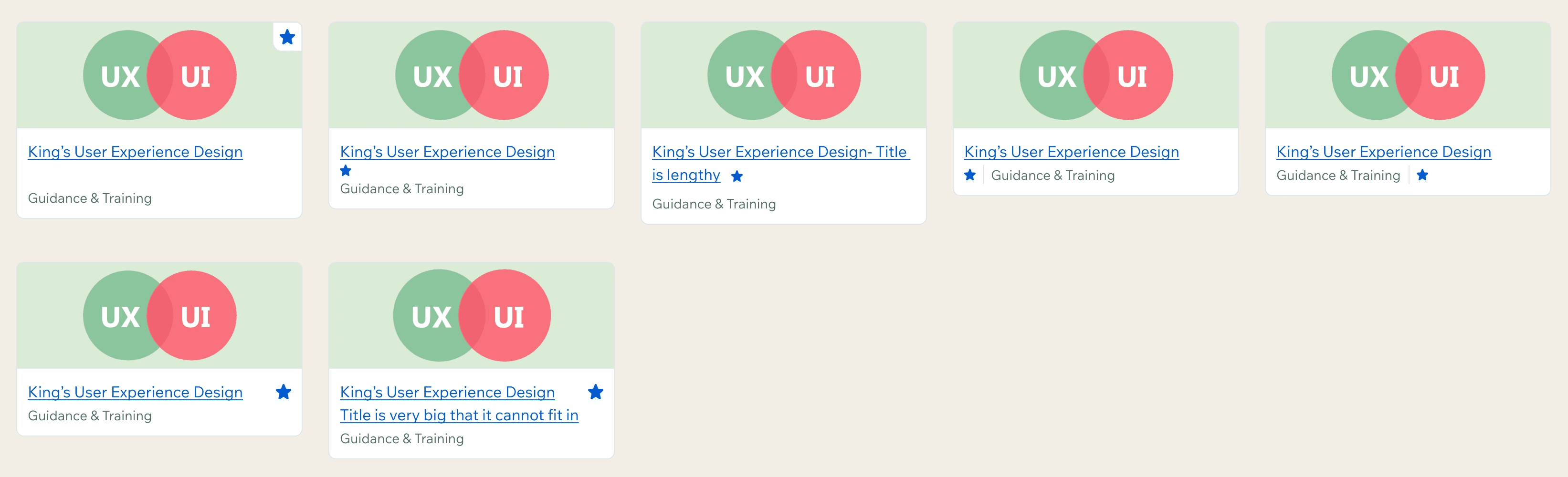
Iterations of Star a Course format
PROCESS
Handing off on a platform that can't afford a wrong build
Working on a Moodle-based platform meant the question of what's buildable couldn't wait until handoff. From the start, I designed against Moodle's core capabilities, what its native components could support out of the box, what would need custom development, and what would need a conversation with the learning technology team. By V2, the trade-offs were already baked in. By V3, every detail in the file was something I knew the dev team could build without us having to revisit the decision later.
The Design Notes document that went with handoff captured the result of that thinking: every change with a Figma link and a short rationale, left alignment for the greeting, the 48px reserved height for course card titles, the conditional arrow logic, the 16px timeline spacing, the 8px corner radius on all CTAs. On a platform where we couldn't afford a single wrong build, removing back-and-forth at the build stage was as much a part of the work as the screens themselves.
I cared about the small things, the corner radii, the spacing rhythm, the subtle hierarchy decisions, more than the visible scope of those changes might suggest. King's is a major institution that students invest significantly in, and KEATS is the product they sit with daily. The level of care the Dashboard showed in those details was a small, visible signal of how seriously the institution took the experience it was offering. That mattered to me.
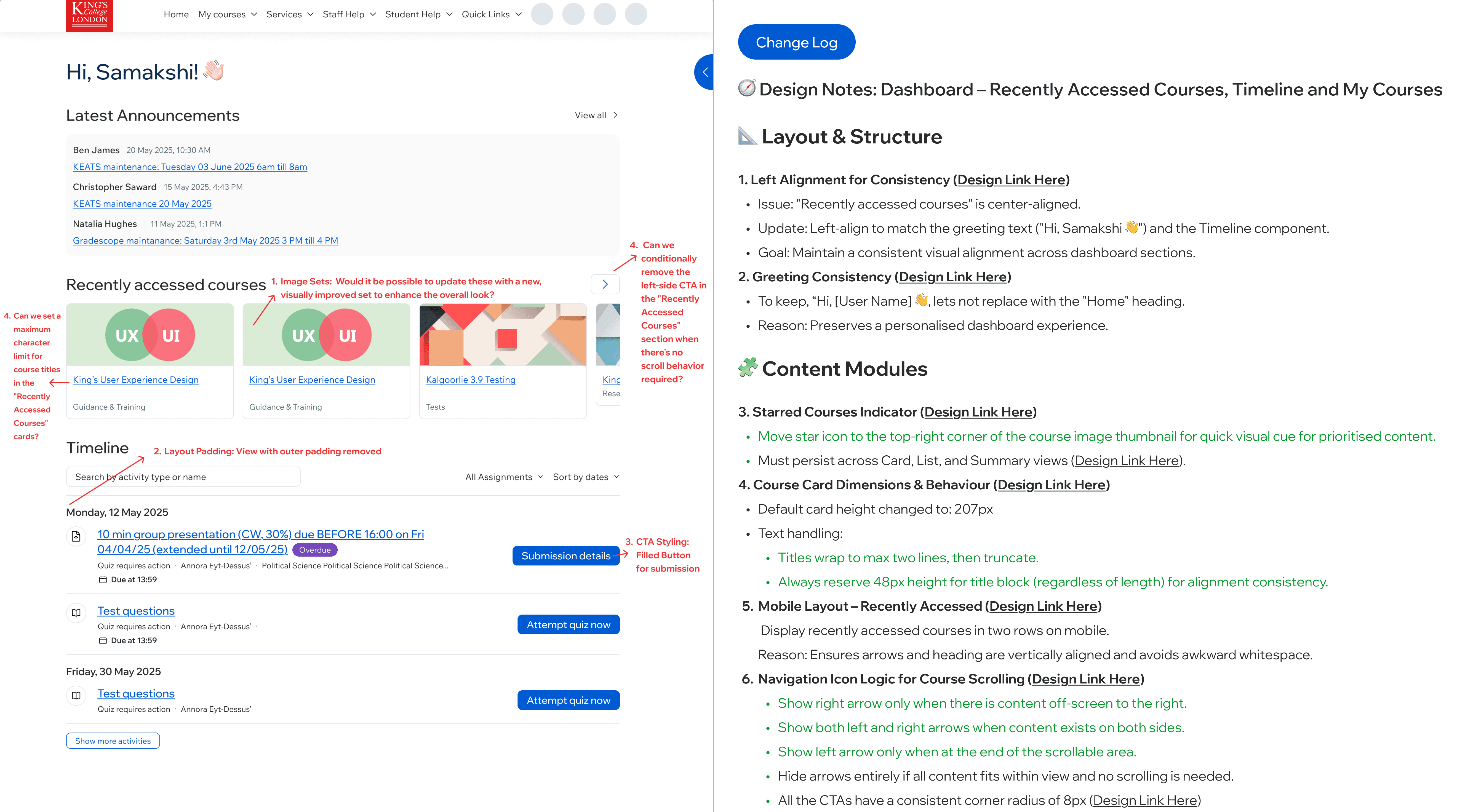
Design Notes: annotated change log for developer handoff
RESULTS
What changed
4×
positive sentiment on the Dashboard between V1 and V3 testing rounds
100%
of guerrilla-tested students rated the experience excellent or good
61%
of prototype test participants preferred the new Dashboard to the existing one
Prototype testing showed task orientation improved, participants located the timeline faster, and showed stronger recall of the page's purpose-driven elements. Ease-of-use ratings rose across every tracked measure.
Guerrilla testing on campus, stopping students and asking them to complete tasks on a laptop running the new platform, returned unprompted words: streamlined, cleaner, pleasing to the eye, soft. Students specifically called out the shorter top menu and the timeline layout on mobile.
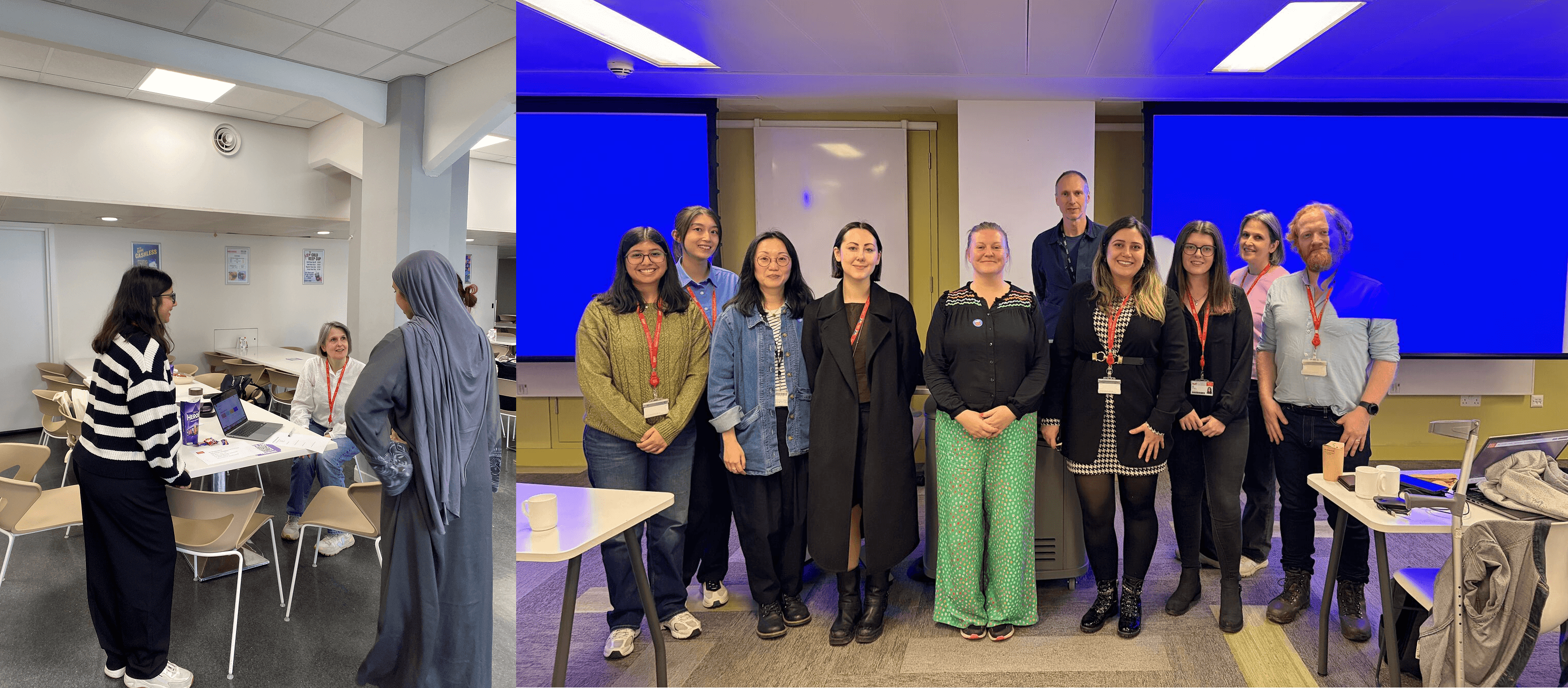
On-campus guerrilla testing, June 2025 (left) and presenting UX work to other Universities in London, November 2025